Introduction
Introduction to the TPlus Class system, including about TPlus Class, purpose of this manual, scope of the system, intended users and workflow overview.
1.1 About TPlus Class System
TPlus Class is a standalone software designed to efficiently automate and manage higher education institution class timetables. It helps administrators create, view, and manage class schedules while avoiding conflicts and applying various constraints.
The system follows a structured workflow from project creation through to final report export, ensuring accuracy and reducing manual scheduling effort.
1.2 Purpose of This Manual
This manual provides step-by-step guidance for staff to operate the TPlus Class system effectively. It covers installation, data preparation, timetable generation, conflict resolution, and report production.
Each chapter focuses on a specific phase of the class timetabling process, with clear instructions and screenshots where applicable.
1.3 Scope of the system
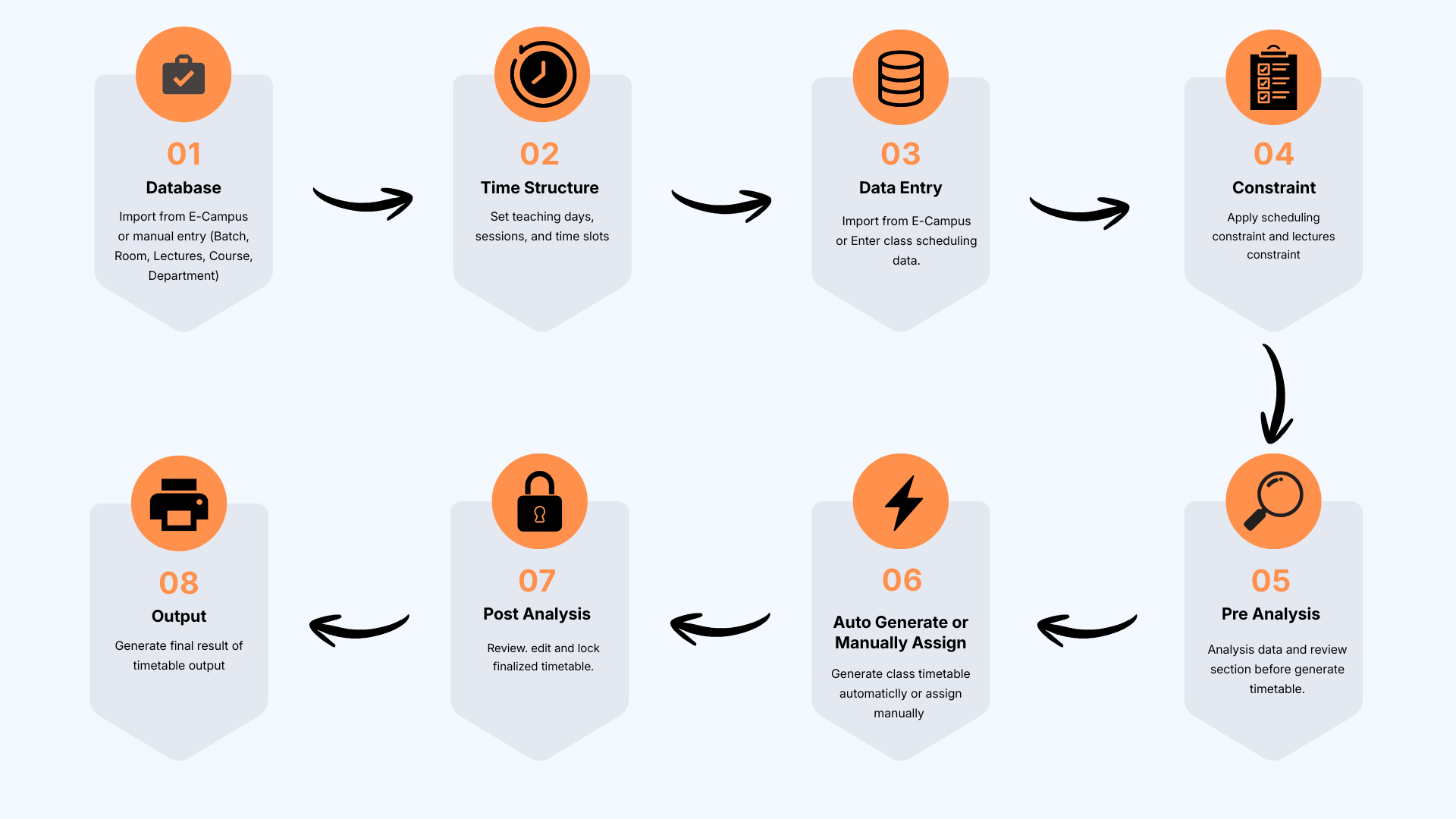
The TPlus Class system follows a linear workflow with eight main stages:
- Create a new project for the timetable session.
- Set up the master database (rooms, courses, lecturers, batches, and departments).
- Configure the timetable structure (teaching days, sessions, and time slots).
- Enter class scheduling data (course, lecturer, batch, and room assignments).
- Apply scheduling constraints and timetable rules
- Generate the class timetable automatically or assign classes manually.
- Review and analyse the timetable to identify and resolve scheduling conflicts.
- Generate and export the finalized timetable and management reports.
1.4 Intended Users
This manual is intended for the following staff:
Timetable Coordinator
Primary operator responsible for scheduling, timetable generation, conflict resolution, and report generation.
Faculty or Department Scheduling Staff
Prepare course, lecturer, student-group, and room information for scheduling.
Academic Administration Staff
Maintain scheduling data and manage timetable updates and outputs.
1.5 Class Timetabling Workflow Overview