Introduction
Overview of the TPlus Exam system, intended users, and examination workflow.
1.1 About TPlus Exam System
TPlus Exam is a desktop-based examination timetabling system designed for educational institutions. It automates the scheduling of examination sessions, manages invigilation duty assignments, allocates student seating, and generates printable reports.
The system follows a structured workflow from project creation through to final report export, ensuring accuracy and reducing manual scheduling effort.
1.2 Purpose of This Manual
This manual provides step-by-step guidance for staff to operate the TPlus Exam system effectively. It covers installation, data preparation, timetable generation, conflict resolution, and report production.
Each chapter focuses on a specific phase of the examination timetabling process, with clear instructions and screenshots where applicable.
1.3 Intended Users
This manual is intended for the following staff:
Exam Timetable Coordinator
Primary operator responsible for scheduling, invigilator assignment, conflict resolution, and report generation.
System Administrator
Handle installation, database management, and system configuration.
1.4 Examination Workflow Overview
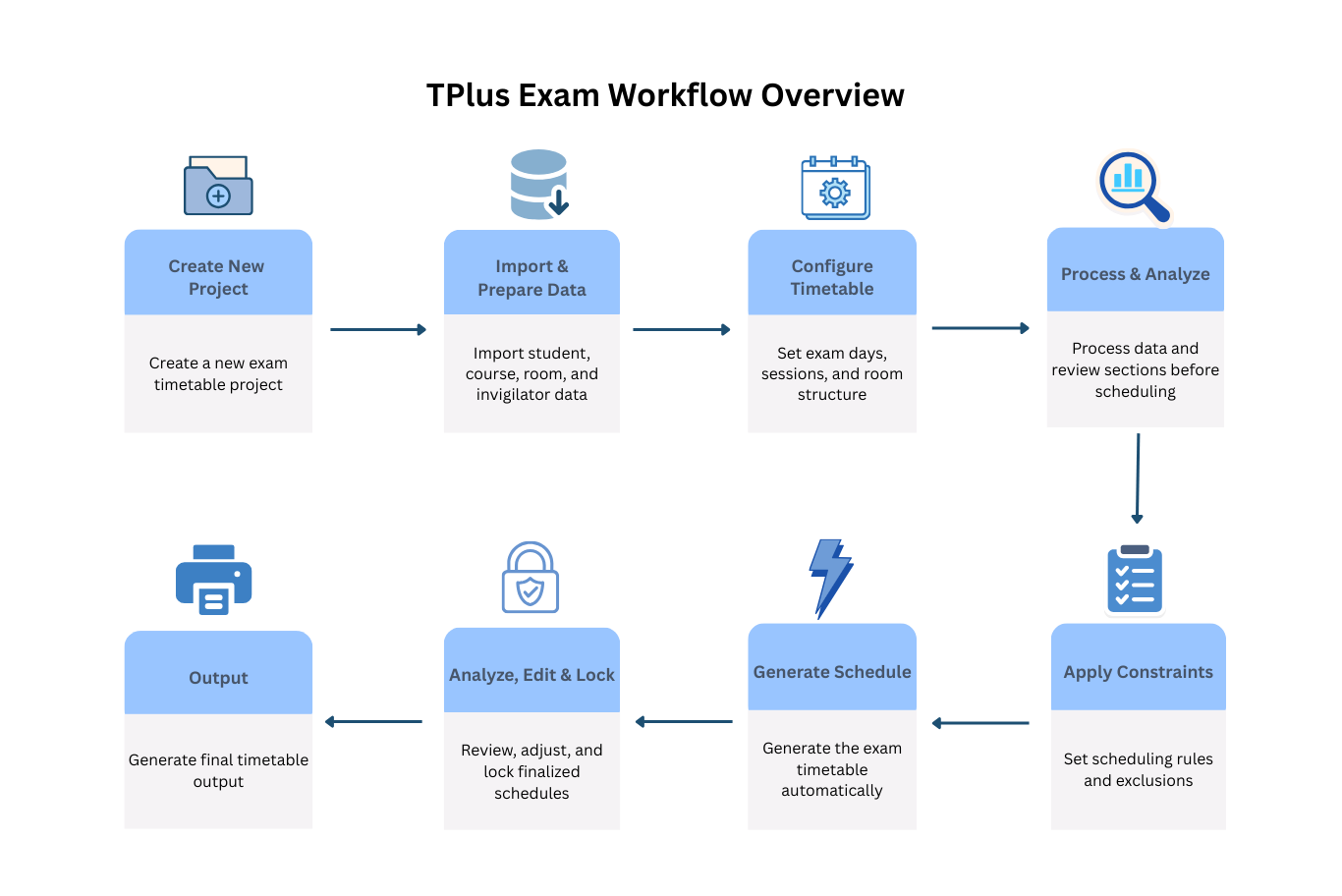
The TPlus Exam system follows a linear workflow with eight main stages:
- Create a new project for the examination session
- Import and prepare data (rooms, courses, students, invigilators)
- Configure timetable structure (dates, sessions, slots)
- Process data and review sections before scheduling
- Apply constraints and scheduling rules
- Generate examination schedules (courses, invigilators, positions, seating)
- Review, adjust, and lock finalized schedules
- Generate final timetable output
1.5 User Roles and Responsibilities
The table below outlines the primary roles and their responsibilities within the system.
| Role | Main Responsibilities |
|---|---|
| Exam Timetable Coordinator | Timetable generation, invigilator assignment, conflict resolution, and report export |
| System Administrator | System installation, database setup, and configuration |